Conclusion
You have taken a major step in your journey as a localization professional. You have moved from passively opening files to operating as an intentional digital architect.
Class 1 Capstone Complete!
You have successfully established your technical foundation in Localization Engineering.
Congratulations on Completing Class 1!
You have taken a major step in your journey as a localization professional. You have moved from passively opening files to operating as an intentional digital architect.
Your New Technical Toolkit
As a graduate of Class 1, you can now:
Navigate Operating Systems & Workspace Trees: Open, edit, and organize plain-text assets (
.json,.vtt,.xml,.csv) across directories without breaking file extensions or introducing smart quote corruption.Rescue Corrupted Text: Identify Mojibake, re-interpret legacy character encodings (
Windows-1252), and convert single assets or entire directories into pristine UTF-8 streams.Protect Code Architecture: Differentiate string keys from string values, safeguard embedded runtime placeholders (
{0},{username}), and write targeted Regex patterns to catch syntax errors.Engineer Reader Comfort: Calculate precise timecode durations, enforce CPS reading speed limits ( cap), and account for language expansion (+30% to +60%) across global UI layouts.
What Comes Next: Step Into Class 2
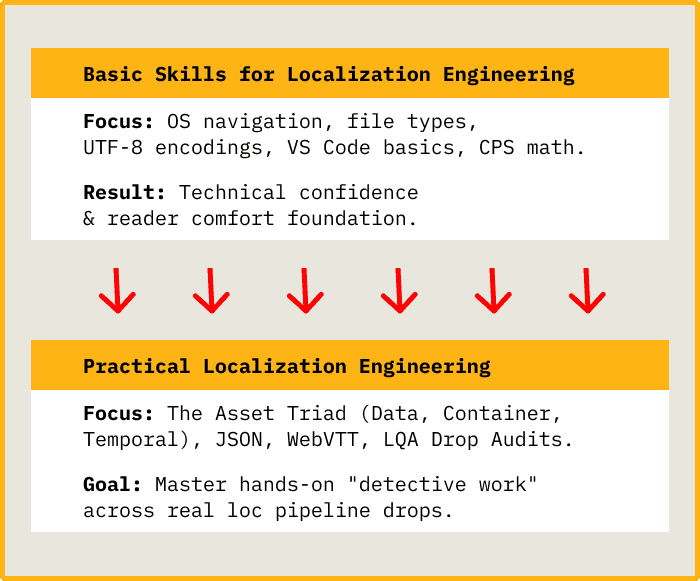
Now that you have built confidence with file mechanics, character encodings, and comfort math, you are ready to step into Class 2: Practical Localization Engineering.
While Class 1 focused on individual files and core concepts, Class 2 moves you directly into hands-on "detective work" across real-world localization pipeline drops.
What You Will Learn in Class 2:
The Asset Triad: Master the interplay between Data (JSON/PO/XML), Containers (XLIFF/Bilingual files), and Temporal Data (WebVTT/SRT).
Deep Parsing & Auditing: Perform Language Quality Assurance (LQA) drop audits on full-scale application string drops.
Investigating Pipeline Breaks: Diagnose and fix real-world build failures, broken variable parameters, and missing keys in live software releases.
Automation & Scripting Basics: Introduction to automating batch checks and setting up pre-flight validation hooks for localization builds.
Resources
- Class1-Class2-Comparison_Yellow.png (image) · Download